Intro
50five is a e-commerce website in 5 countries and 4 languages.
Each country can be considered like a separate website, sharing with the others informations about products and texts in the interfaces (text in buttons, navigations, header and footer) and some static pages (terms and conditions, FAQ, privacy policy) translated in 4 languages.
Each local website contains articles, landing pages, promotional pages and static pages which are specific for that country, in one or more languages.
Each country can be considered like a separate website, sharing with the others informations about products and texts in the interfaces (text in buttons, navigations, header and footer) and some static pages (terms and conditions, FAQ, privacy policy) translated in 4 languages.
Each local website contains articles, landing pages, promotional pages and static pages which are specific for that country, in one or more languages.
Issue
We run into many issues related to data entry and translations.
Content in the website looks messy and sometimes in the wrong language despite the fact that there isn't any bug in the code and the content team is experienced and reliable.
Content in the website looks messy and sometimes in the wrong language despite the fact that there isn't any bug in the code and the content team is experienced and reliable.
The platform used to manage contents, not being originally designed to handle multi-language and multi-country articles, seems to be insufficient to handle the amount of information required.
Research
Understand how the system works
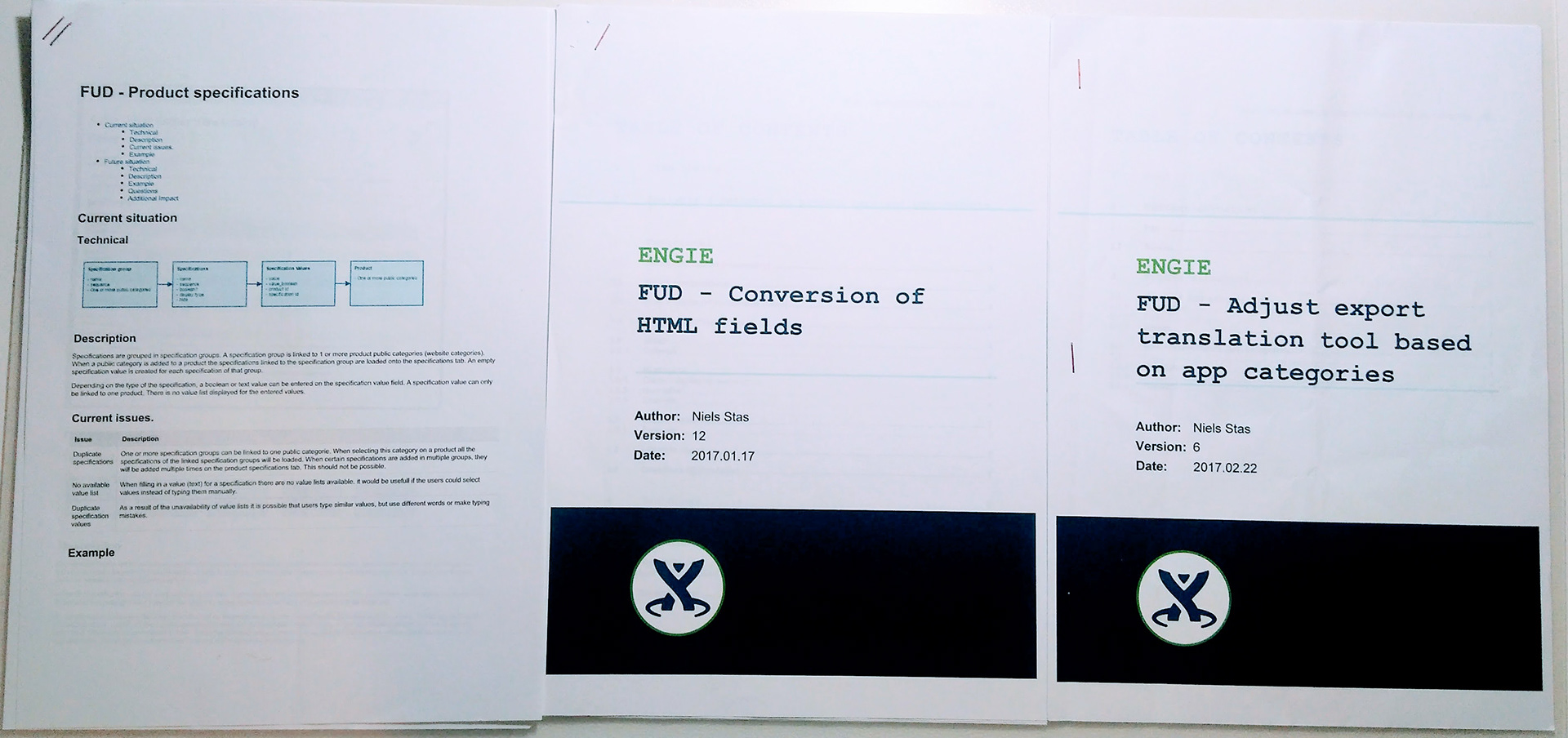
The first critical step was to understand and document how the system currently worked. Since the Odoo platform used to build it had been heavily customised, I had to rely on the knowledge of the developers who built it. I read their functional design and interviewed them to build simple diagrams of the functional architecture of the system.
Impact on the content team workflow
Second step was to understand how this architecture was impacting the workflow of the content team.
I shadowed the content team tasks to build a user journey. I realised the flow was pretty simple but some interfaces were accountable for the human errors. I was able to identify the most frequent and most error prone steps of their flows. I run semi-structured interviews to collect their pain points, understand where they get most confused, and measure their level of frustration on those tasks.
I shadowed the content team tasks to build a user journey. I realised the flow was pretty simple but some interfaces were accountable for the human errors. I was able to identify the most frequent and most error prone steps of their flows. I run semi-structured interviews to collect their pain points, understand where they get most confused, and measure their level of frustration on those tasks.
Impact on the product
Together with the content team I evaluated the impact. We created metrics to measure the quality of the content and run a heuristic to evaluate how many errors were produced using the current system.
In the timespan of one week they counted 11 regression errors on 18 inserted content.
In the timespan of one week they counted 11 regression errors on 18 inserted content.
Cross system architecture and error prone steps
Third step was to cross the system architecture and the identified error prone steps. This way I could identify the changes in the architecture that would have improved the human interaction with the system.
Details
How translations are stored:
Every text in the website is split in blocks related to the html element containing them.
All these blocks are stored together without any group or category.
There is no way to know to which page a block belongs.
There is no way to know if to a certain block are attached multiple translations.
Static pages are stored entirely as translation blocks. Contents can contain html code.
Every text in the website is split in blocks related to the html element containing them.
All these blocks are stored together without any group or category.
There is no way to know to which page a block belongs.
There is no way to know if to a certain block are attached multiple translations.
Static pages are stored entirely as translation blocks. Contents can contain html code.
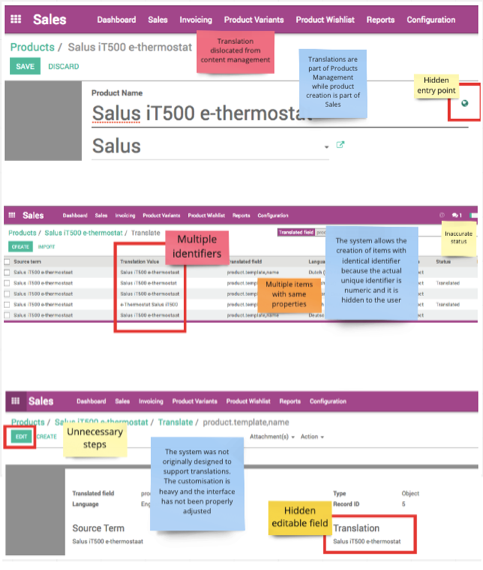
Issues related to the initial situation:
Workflow is inconvenient:
It's hard to find terms to translate in the bucket of translated terms.
It's hard to find terms to translate in the bucket of translated terms.
Quality of data is poor:
There are many duplicates and the amount of unused translation increases more and more.
There are many duplicates and the amount of unused translation increases more and more.
CMS system is buggy:
Creating translations from the front-end cms tool injects html and special characters in contents. That makes even more difficult to edit content.
Creating translations from the front-end cms tool injects html and special characters in contents. That makes even more difficult to edit content.
Quality of UI is tricky:
Texts appear in the wrong language on the website.
Texts appear in the wrong language on the website.
Data are unstable:
Sometimes after the release some changes in translations are reverted.
Sometimes after the release some changes in translations are reverted.
The Challenge
With the minimum development effort possible, re-design the way we store information and translations and the way internal users access and edit these information.
Impact
# Less time spent to edit and fill contents
# Texts in the right languages
# Easy access to not-trained users to face big data-entry needs
# Increase of the size of the product portfolio in a shorter time
Ideation
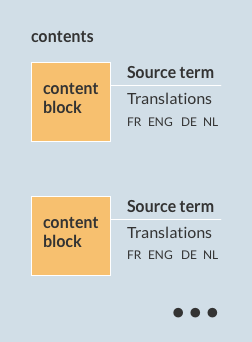
My proposal to solve this problem was to improve the way we store and use content in the website, adopting the following changes:
Separate content texts (like product descriptions, articles, terms and conditions) from interface texts (text in buttons, menus, footer)
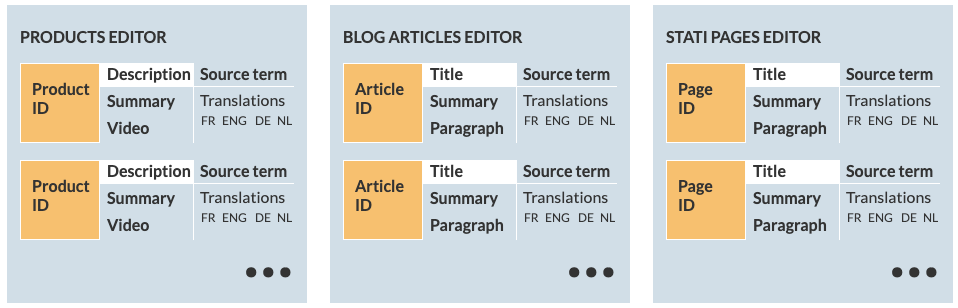
Create an editor for each type of content as unique tool to edit content
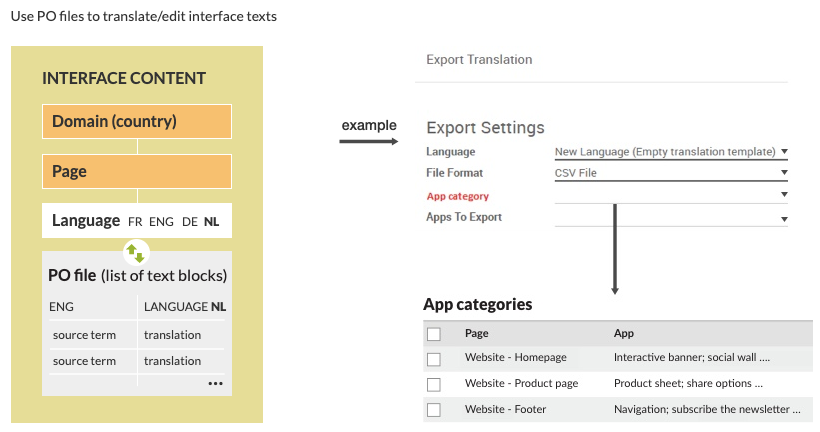
Use PO files to translate/edit interface texts
Don't allow any code in contents (use markdown editors to format the text)
Content editors:
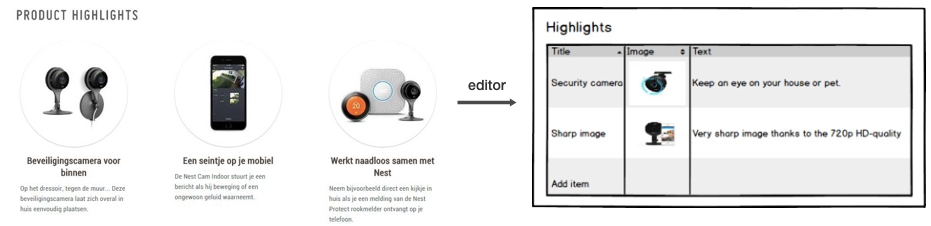
Every component whose content can be translated has its own editor.
The editor is reachable from the back-office page where the information belong: in a product page, in a blog article, in a marketing page.
The editor is reachable from the back-office page where the information belong: in a product page, in a blog article, in a marketing page.
Example
Interface Editor
Improvements related to the new situation:
More convenient workflow:
Classifying contents makes it easier for internal users to find the text they want to edit.
Classifying contents makes it easier for internal users to find the text they want to edit.
Better quality of data :
It is easier to isolate content and to check for duplicate translations.
It is easier to isolate content and to check for duplicate translations.
CMS system works fine for marketing content only:
Use of cms system is limited to the creation of temporary static pages for marketing campaigns. All other contents are edited via back-office website and dedicated editors.
Use of cms system is limited to the creation of temporary static pages for marketing campaigns. All other contents are edited via back-office website and dedicated editors.
Quality of UI translation ensured:
Interface text and contents rely on separate systems. Interface texts are stored in PO files that can be downloaded, edited and uploaded again. There is no editor in the back-office website for those contents.
Interface text and contents rely on separate systems. Interface texts are stored in PO files that can be downloaded, edited and uploaded again. There is no editor in the back-office website for those contents.
Stable data structure:
We have no more regression errors related to contents.
We have no more regression errors related to contents.